Welcome everyone to the Medical Appraisal's 2025 Winter Newsletter, an informal year-end update on our progress in various projects.
We hope you find this useful and as ever, all feedback is welcomed!
William Liu
Training Manager (Medical Appraisal)
A "phishing" scam is where someone makes contact (either through messaging, email or phone etc) pretending to be from a legitimate source to trick you to reveal sensitive information like password or bank details.
This scam is not new but we have recently learnt of a new approach where these scammers try to reach out to users via MS Teams directly, claiming to be from Microsoft. You might see variations of something like the below image:
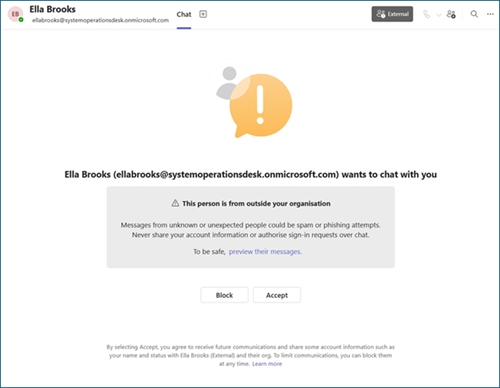
First and foremost, if it looks suspicious - flag it with IT.
If you did engage with these folks, be aware that Microsoft (nor anyone from NHS IT support) would never ask you for your password or security access codes. Never.
If in doubt, stop engaging and flag it with your local IT support.
As you may or may not have heard, NES and NSS are coming together to form a new NHS organisation, tentatively called NHS Delivery. This is part of the Scottish Government's service renewal framework and this new organisation will officially commence on 1st April 2026.
An organisational change of this size and significance will often bring confusion and rumours. I want to reassure all users that the work of the Medical Appraisal Scotland team will be carried into the new organisation. Our service provision and commitment to you will remain. We will continue to provide user support on SOAR, as well as delivering medical appraiser training and events.
Contact points or email addresses may change in line with the new organisation, but please be assured that we will continue to provide the same level of support we have been throughout the years.
The correct SOAR helpdesk contact is SOAR@nes.scot.nhs.uk; or you can use the helpdesk icon on SOAR when you have logged in.
You may have noticed that since the summer, SOAR automated emails have been sent from SOAR@nes.digital. Please be advised that this is not a real email address. Due to a change in systems infrastructure, we had to change it so that system emails sent from SOAR were different to our actual helpdesk email. Our apologies if you had been trying to contact us via this email with no response.
We look after two mailboxes, one for SOAR (as above) and the other for Medical Appraiser training events (Medical.Appraisal@nes.scot.nhs.uk).
For SOAR related queries please email SOAR@nes.scot.nhs.uk to avoid delays in our response.
We have managed a number of user queries following the SOAR redesign at the start of the year. The developers are still working in the background on several issues but in the meantime, I thought it'd be worthwhile collating the most common issues we have encountered on the helpdesk and share these with you.
If you have trainer roles but this is not reflected, either in the ROT form or on the Form 4 - please contact the helpdesk (SOAR@nes.scot.nhs.uk) with your GMC number and details of the role(s) missing and we will manually intervene and add these in for you.
There were a few pages and sections that were not completed as part of the SOAR redesign - the ROT form is one of them and as such, when you access the ROT form, you are redirected back to old SOAR to complete this. Please proceed and complete as per usual.
For info, the other sections still sitting on the old SOAR platform are the MSF functions and the Academic Medicine forms.
On the subject of MSF - we discovered that the MSF reports, whilst still downloads automatically directly into SOAR from WASP, requires it to be manually added to the supporting information in order for them to appear in the submission. If this applies to you please follow the below steps to add the downloaded MSF report to your submission:
This will add the MSF report so that it is included when you submit them for sharing. If you have already submitted your appraisal forms to your appraiser, you just need to resubmit to refresh the submission.
One of the major changes we made was how users login to SOAR. Since the system changes, we have linked SOAR with Turas, making use of the Turas two-factor authentication login. This means that once the two accounts are linked, you will only ever need the Turas login details to access SOAR.
For more information please check out the guidance on our user guide.
When adding CPD credits/hours, please make sure to:
Otherwise, the CPD entry will not save correctly and it will cause an error.
If your CPD item is worth over 100 credits, add the entry as you normally would and enter 100 as the credit value, then contact the SOAR helpdesk and let us know your GMC number and the name of the CPD title - we will overwrite this manually for you on the database.
If that’s not the issue then please let us know the names of the CPD titles or documents you tried to upload, and we will investigate further from there.
Asterisk error message stopping you from saving? Apologies for the confusions caused - please ignore and disregard those asterisk messages.
They were designed to be an indicator letting users know there's mandatory questions on the page. Be assured that the changes you saved will have saved correctly, disregard the message and proceed. We will work with developers to improve on this in the next iteration of development.
Some users have reported issues of losing work when saving after a prolonged period, especially those with more than one user role on SOAR. This has been difficult for the developers to fix due to different browser security settings with local devices which overwrites the default timeout settings.
The advice here is to get into a regular habit of clicking on the "Save" button if this applies to you. The web team will continue to review options this in the background to look improve this.
Some health boards have disabled access to local drives where everything is cloud based, therefore making it difficult for doctors to download/upload documents to SOAR.
This is a local IT issue and whilst we don't have a function that allows direct upload from cloud to SOAR, there is a workaround where you create sharable links on OneDrive or other cloud-based storage setups.
For more information please visit the technical queries section on our website.
SOAR was designed to handle one annual appraisal at a time and this has been reinforced in the new setup.
If you have more than one opened / incomplete appraisal on SOAR (you can check this by clicking on "Appraisal History" via blue menu at top of page), it will cause you issues when submitting appraisal forms as it will try to submit to the oldest appraisal first.
If this applies to you, please contact the helpdesk with your GMC number, and confirm the status of the previous/opened appraisals (e.g. didn't take place, postponed etc) and we will investigate and assist further from there.
Whether you are an International Medical Graduate, or a Clinical Fellow, or just CCT'ed, or relocated from another country, we have a short module that helps you understand what medical appraisal is about and how you are expected to engage with the process.
Please visit the module on our website for more information.
Additionally, you may also find the below resources of interest to you:
Key updates from the most recent clinical review of the Scottish Referral Guidelines for Suspected Cancer are now incorporated into GatewayC – the leading earlier cancer diagnosis resource.
There are future plans to incorporate direct links between SOAR and GatewayC, but in the meantime you can Register to GatewayC to gain over 50 hours of free cancer-focused CPD.
This work is supported by the Scottish Government’s Detect Cancer Earlier (DCE) Programme, in partnership with NHS Education for Scotland (NES), GatewayC is supporting the adoption of SRGs, to help improve cancer outcomes. For more information please check the article on our Medical Appraisal Scotland website.
There will be helpdesk support on SOAR during the festive holiday period from 23rd December, albeit slower than usual. Normal service will resume on 5th January 2026.
Please continue to send your SOAR tickets to the helpdesk via SOAR@nes.scot.nhs.uk
And finally...
On behalf of all the team, we wish you and your loved ones all a safe and wonderful time over the festive break, and a very Happy New Year when it comes.

This page was last updated on: 26/03/2026